


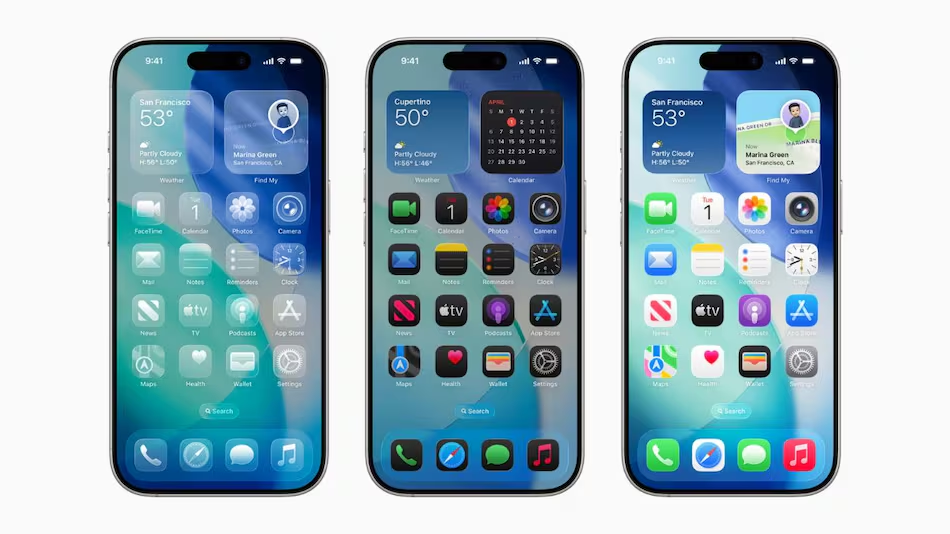
Apple has officially released iOS 26 for iPhones, alongside iPadOS 26 for iPads and macOS Tahoe for Mac computers. First previewed at the Worldwide Developers Conference (WWDC 2025) in May, the latest operating system updates bring Apple’s new Liquid Glass design, enhanced lock screen customization, performance upgrades, and Apple Intelligence—an advanced AI-powered feature suite designed to improve everyday productivity.
The rollout begins today, and the updates will be available globally over-the-air (OTA). iPhone 17 series and iPhone Air devices will ship with iOS 26 pre-installed, while several older models can now download the new software. Similarly, iPadOS 26 will extend support to iPads as old as the 8th generation, and macOS Tahoe is launching for Mac models dating back to 2019.
iOS 26: Eligible iPhone Models
iOS 26 is supported on:
- iPhone 17 series (ships with iOS 26)
- iPhone Air (ships with iOS 26)
- iPhone 16e
- iPhone 16 series
- iPhone 15 series
- iPhone 14 series
- iPhone SE (2022)
- iPhone 13 series
- iPhone 12 series
- iPhone 11 series
How to Install iOS 26
- Open Settings on your iPhone.
- Go to General > Software Update.
- Wait for iOS 26 to appear.
- Tap Download & Install.
- After installation, the device will restart with iOS 26.
iPadOS 26: Supported iPads
Apple has confirmed that iPadOS 26 is compatible with:
- iPad Pro (M4)
- iPad Pro 12.9-inch (3rd gen and newer)
- iPad Pro 11-inch (1st gen and newer)
- iPad Air (3rd gen and newer, including M2 and M3)
- iPad (8th gen and newer, including A16)
- iPad mini (5th gen and newer, including A17 Pro)
How to Install iPadOS 26
- Open Settings on your iPad.
- Navigate to General > Software Update.
- Tap Update Now once iPadOS 26 is available.
- Press Install Now to begin the process.
macOS Tahoe: Compatible Mac Devices
macOS Tahoe introduces refreshed visuals, productivity tools, and security upgrades. Eligible Macs include:
- MacBook Air with Apple silicon (2020 and newer)
- MacBook Pro with Apple silicon (2020 and newer)
- MacBook Pro (16-inch, 2019)
- MacBook Pro (13-inch, 2020, Four Thunderbolt 3 ports)
- iMac (2020 and newer)
- Mac mini (2020 and newer)
- Mac Studio (2022 and newer)
- Mac Pro (2019 and newer)
How to Install macOS Tahoe
- Click the Apple Menu at the top-left of your Mac screen.
- Select System Settings > General > Software Update.
- Wait for macOS Tahoe to appear.
- Click Update Now.
- Enter your admin password and allow the installation to complete without closing the lid or putting the Mac to sleep.
With these updates, Apple is reinforcing its ecosystem with AI-driven tools, smoother user experiences, and extended support across older devices, ensuring more users can benefit from its latest innovations.