


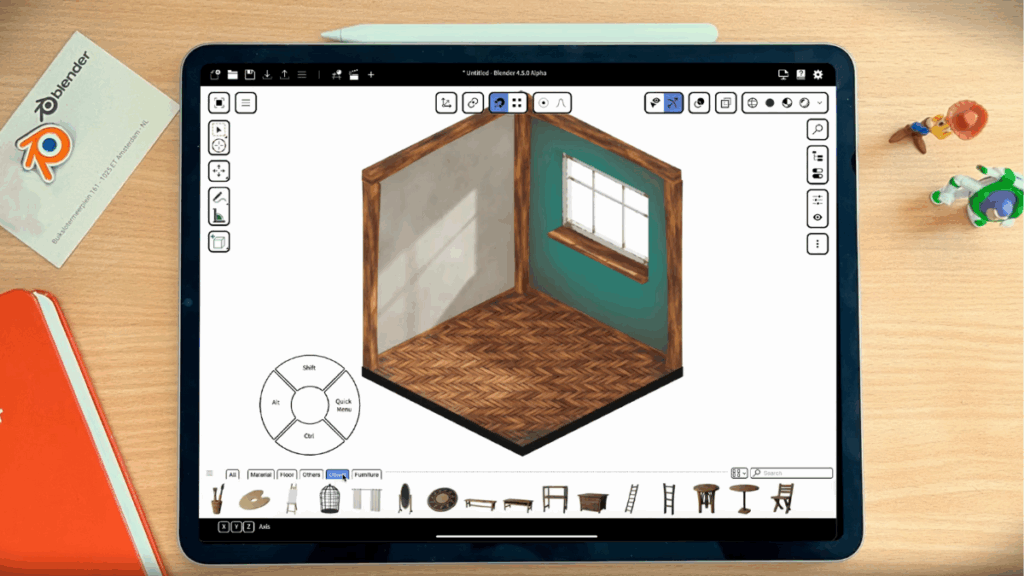
Blender is preparing to introduce a standalone application tailored specifically for the iPad Pro, with complete support for Apple Pencil, aiming to bring its powerful 3D modeling and animation tools to portable touchscreen devices. The company has officially confirmed the development through a recent blog post, revealing that the new app is designed for creative professionals who rely primarily on tablets for their work.
Initially, the app will launch on the Apple App Store and will be available exclusively for iPad Pro users. The version will make full use of the Apple Pencil to support precise operations like sculpting, 2D animation, and painting. Blender has already showcased early visual previews of the app’s interface, which features stylus-optimized controls and a touch-friendly environment. Plans are also underway to release the app on Android tablets and other graphic-oriented devices such as the Huawei MatePad, Microsoft Surface, and Wacom MovinkPad.
The company aims to adapt the full range of Blender’s capabilities for compact screens. To achieve this, they are focusing on improving input methods, refining application templates, and ensuring compatibility with standard Blender builds. One of the standout features in the iOS version could include AirDrop integration, allowing users to easily share files across Apple devices.
Blender’s team acknowledged the challenges in developing for tablets, such as limited screen space, absence of a physical keyboard or mouse, restricted processing power, and battery limitations. Despite these hurdles, the company has committed to building a user interface that accommodates both stylus and touch-based navigation. The app’s interface might include custom application templates, overlay wheel menus for quick access to tools, sidebar tabs, and easy navigation to the Outliner and Properties Editor within the 3D viewport.
In addition to standard features, Blender is exploring tablet-exclusive enhancements such as gesture controls, multi-touch functions, an interactive status bar, and support for managing multiple active screen regions. This move positions Blender to serve mobile-first digital artists and professionals who prefer working on the go.